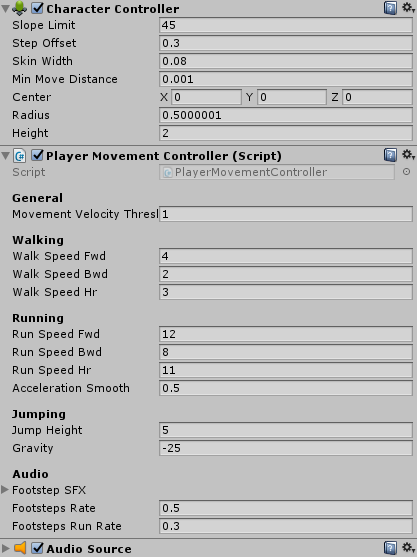
Player Movement Controller
Tune walking, sprinting, jumping and footsteps.
The player root has CharacterController and PlayerMovementController. Keep the AudioSource used for footsteps and assign the footstep clips when using this behaviour.
The Inspector exposes forward, backward and horizontal speeds separately for walking and running, acceleration smoothing, jump height, player gravity, and footstep timing. This gravity belongs to player movement; it is separate from the environment gravity used by bullets.
Desktop controls read RSBDemoInput.Move, Jump and Sprint. On the mobile path, movement comes from DemoMobileController.MoveInput. Start from the corresponding desktop or mobile scene when adapting those branches.
The static PlayerState reports Idling, Walking, Running or OnAir. EPlayerStateChanged notifies listeners when it changes. MotionController uses this to switch movement effects. Because the state and event are static, this example is designed around a single player controller.
There are no public MoveInput() or JumpInput() methods in this class. To feed another controller, adapt its input reads or implement IRSBDemoInput; see Input and controls.