Dynamic Scope System
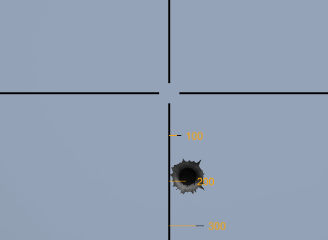
Display a reticle, range marks, zoom levels and wind estimates.
Move the bullet-time cube aside to (15, 0, 100). Create a regular target at (0, 0, 200), scale (3, 5, 3), and keep wind at zero initially.
Drag SAMPLES/Prefabs/CANVAS - Dynamic Scope System.prefab into the scene. On its ScopeReticle child, assign the aiming camera to Main Camera in DynamicScopeSystem. Keep the prefab's Canvas, CanvasGroup, font and UI references intact.
Activate the scope
After activating the bullet asset, add the following to the tutorial shooter's Update:
if (RSBDemoInput.Pressed(RSBDemoAction.Aim))
    DynamicScopeSystem.instance.ScopeActivation(true, bulletProperties);
if (RSBDemoInput.Released(RSBDemoAction.Aim))
    DynamicScopeSystem.instance.ScopeActivation(false, bulletProperties);
Hold right mouse to aim with the sample bindings. ScopeActivation also accepts a delay and an instant-activation flag. Pass the bullet you are actually firing so its trajectory data can be used for the indicators.
Zoom and drop marks
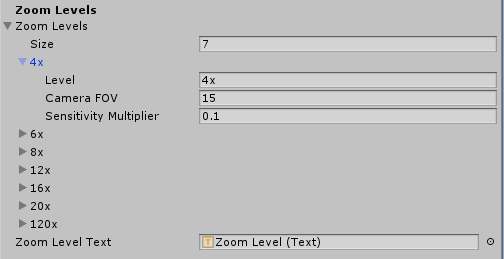
Each Zoom Level has a display label, camera FOV and sensitivity multiplier. DynamicScopeSystem reads the demo scroll input while active; your own input can call ZoomIn() or ZoomOut(). Do not process the same scroll input twice.
ScopeSensitivityMultiplier is a static read-only property for your look controller. The supplied PlayerCameraController uses it automatically.
Drop indicators are generated at 100-metre intervals up to Max Scope Drop Distance. Fire at the 200-metre target with zero distance 0, then change zero distance to 200 and compare the impact. The indicators update with zero distance and zoom. They are estimates based on the selected bullet, not a replacement for checking actual shots.
Wind and appearance
Add a world-space wind vector to the environment. The direction indicator shows wind direction and speed; the horizontal wind-point indicators estimate where the bullet lands at each displayed range. If the estimated position is outside the visible range, the optional Extreme Wind warning helps identify the clamped indication.
You can adjust indicator colours, widths, height, text font and size, minimum spacing, maximum displayed range, visibility below the zero distance, and wind direction/point displays. Keep the maximum range appropriate to the bullet; the current scope hides drop indicators and skips wind-point calculations for bullets below 100 m/s.
The canvas uses Unity UI Text and Images. Profile wind indicators on your target hardware, especially mobile. Make a prefab variant for visual changes rather than editing the supplied preset directly.