Getting startedHit events
Spawning particles on hit
Place pooled impact effects at the reported hit position.
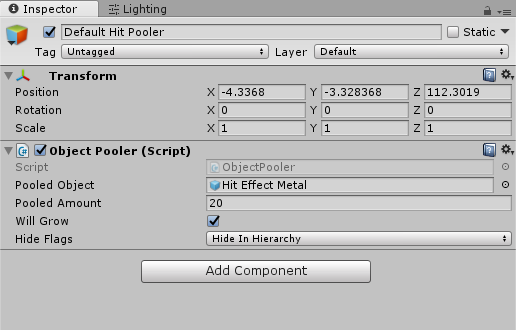
Create a Default Hit Pooler, add ObjectPooler, and assign Objects/Particles/Hit Effect Metal.prefab. Add this listener to a GameObject and assign the pool:
using IE.RSB;
using UnityEngine;

public sealed class TutorialImpactEffects : MonoBehaviour
{
    [SerializeField] private ObjectPooler hitPool;

    private void OnEnable() => SniperAndBallisticsSystem.EAnyHit += OnHit;
    private void OnDisable() => SniperAndBallisticsSystem.EAnyHit -= OnHit;

    private void OnHit(BulletPoint point)
    {
        GameObject effect = hitPool.GetPooledObject();
        if (effect == null) return;
        effect.transform.SetParent(null);
        effect.transform.SetPositionAndRotation(
            point.m_endPoint, Quaternion.LookRotation(point.m_hitNormal));
        effect.SetActive(true);
    }
}
Fire at the cube to see the metal impact. The effect deactivates after its configured lifetime and can be reused. Your own effect prefab should have equivalent cleanup, such as ObjectDeactivator.
The supplied HitListenerSpawnParticle already selects between default, metal, wood and body effects. If you use that listener, assign all its pools and remove the tutorial effect listener to avoid duplicate particles. The system sample prefab already contains configured listeners.